
***Home Music Production/Mixing/Mastering Tutorials
***Music Publishing and Music Business Tutorials

Complete EQ settings to Start when doing Audio Mixing

by: Emerson ManingoEmail Author on December 21, 2011 in Music Mixing

In this post, I would like to share my most favourite EQ settings for different instruments in the mix. Feel free to try, of course this is not a one setting-fits-all solution; at least you have something to start with. The following settings assume that your mix has lead vocals on it as well as guitars, bass, and drums etc. You should use a parametric equalizer to implement the settings below such as Waves Paragraphic EQ:

Waves paragraphic EQ

Some settings suggest low/high shelf filtering. Please read this post to find out what is low shelf and high shelf filters in parametric EQ if you are not still familiar with this.

These are the settings (drop me a message if you want to add some more instruments that are not included in the lists):

1.) Vocals (female)

3000Hz Q=1.0, +2dB (Note: improve vocal clarity and lyrics)
15000Hz Q=1.0, +2dB (Note: improve vocal ambiance)
Low shelf = 150Hz, -6dB (Note: remove lower bass on vocals)

2.) Vocals (male)

1000Hz Q=1.0, +2dB
15000Hz Q=1.0, +2dB
Low shelf= 100Hz, -6dB

3.) Background vocals (female)

3000Hz Q=1.4, -6dB (Note: Cut to make lead vocals clear with backup vocals)
12,000Hz Q=1.0, +3dB
250Hz Low shelf, -6dB

4.) Acoustic Guitars or Clean guitars

3000Hz Q=1.0, -9dB (Note: Make lead vocals cut through the mix)
200Hz Low shelf, -9dB (Note: Cut to remove bass sound of guitars avoids mud with bass guitar or kick)
5000Hz Q=1.4, +2dB (Note: Improve brilliance high-end sound on guitars)
800Hz Q=1.4, -6dB (Note: Remove irritating harsh mid tones on some guitars)
8000Hz High Shelf, -2dB (Note: Remove the disturbing sibilance on guitar tones associated with using pick)

5.) Distortion Guitars

200Hz Low shelf, -9dB
400Hz Q=1.0, +3dB (Improve the power and body of distortion guitar sound)
3000Hz Q=1.4, -6dB (cut to improve vocal clarity with rock music)
6000Hz High Shelf = -2dB (cut to remove harshness and sibilance in poor sounding distortion tone)

6.) Bass guitar and Kick Drums
Read the rest of this entry »

How to Prepare and Send Recorded Tracks for Audio Mixing

by: Emerson Maningo Email Author on December 11, 2011 in  Music Mixing

Let’s have this example. Have you ever thought; “How am I going to make my recordings compatible with any DAW for mixing”? Supposing you are producing a song; then you are recording the tracks. All tracking are now complete in your own DAW or tracking software. You won’t be mixing the track; then you asked this question: “How am I going to make the recordings compatible with any mixing engineer DAW?” All of these details will be discussed in this post.

Basic Essentials- Complete the Tracking and Don’t Apply Effects

If you are record producer in-charge of the project, don’t apply effects to the recorded tracks on your mixing software. Leave that to the mixing engineer. All necessary/required effects should be applied during the recording session such as:

1.) If you are recording/tracking guitars; the guitarist would naturally use some effects on his own such as distortion, chorus, etc. To capture these effects naturally you would be recording the guitars using amp cabinets. So the effects are added naturally during recording. The signal paths are as follows:

Guitars — > Effects pedal (distortion, chorus, etc) — >Guitar amplifier — > microphones — > Audio Interface — > DAW

2.) Some bass guitars or other instruments are using effects just like guitar. So you need to capture them during the recording process.

The vocals are mostly recorded dry without any effects on it. Then you should complete all the needed recordings for the song. This includes all the overdubs, back-up vocals, additional guitar solos, etc.

Then make sure you are correctly naming the audio recorded files. Do not simply name the track as “Track1.wav” because it can confuse the mixing engineer. Make it as descriptive as you can, e.g. “Guitarleft.wav” or “Leadvocals.wav”.

When saving the audio files using a new name, make sure to save it in correct format as it was recorded. If you are recording it as 24-bit/48KHz then save the new file with the new file name also in 24-bit/48KHz. The PCM WAV audio file format is a standard and can work with any digital audio workstation software.

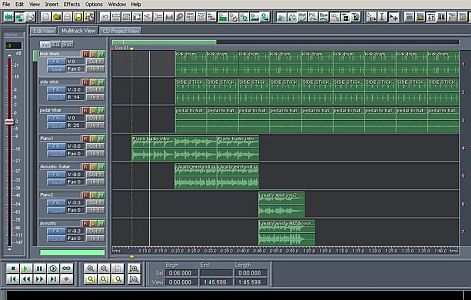
OK, at this stage your recording should be clearly labeled and no effects applied on the DAW (except during the recording).The next thing is to combine all loops into a single WAV file. For example, a very common loop used in a track are drum loops created by drum sequencing software, see below:

Drum Sequence
Read the rest of this entry »

How to mix audio for perfect clarity and space

by: Emerson Maningo Email Author on December 10, 2011 in  Music Mixing

So you find it easy to isolate musical instruments with different frequency characteristics. For example if the mix is only consist of a simple vocal and a bass guitar; then even without any effects the vocal and the bass would stand out naturally because they are occupying completely different frequency characteristics.

As you might know, vocals frequencies are common around 300Hz to 3000Hz while bass guitar obviously occupies below 200Hz; so finding space for them in the mix is not really a serious problem. But what about you have two or more instruments in the mix having the same frequency characteristics? This is where you can see a lot of challenges in the audio mixing process because it is becoming hard to isolate them properly in the mix.

The following are very common audio mixing issues:

1.) Vocals vs. the Background vocals – particularly if the lead and background vocals are both female or both male. But in case of a male lead singer with female background vocals or vice versa; it won’t be a serious problem since female voices tends to occupy at a higher range of vocal spectrum.

2.) Kick drum and bass guitar – this is often a common source of audio mixing issues.

3.) Guitar vs. Vocals vs. Other string or wind instruments (violin, flute, etc.) – these instruments have the same frequency characteristics, becoming harder for them to isolate properly in the mix.

Effects that you can use to improve clarity and space in the mix

For best results, you would be using the following effects:

1.) Parametric EQ –Basically the principle is that; supposing two instruments sound the same (or occupying the same frequency spectrum); you can use EQ to make them sound different in the mix. This is done by applying the concept of “contrasting EQ”. This works by boosting a certain frequency range favoured for that first instrument for clarity/definition and then cutting that same frequency range on the second instrument. Make sure that the amount of cut and boost are in the same values but in opposing direction. The Q should be the same as well. See an example EQ setting of two instruments occupying the same frequency spectrum applied with “contrasting EQ” effect:
Read the rest of this entry »