
Professional sound recording is very easy to spot: it sounds so wide and with great ambiance. Do you think this is a very difficult technique? No, the technique is very easy. Think of live sound recording or a band playing live in front of you. What do you see and feel?
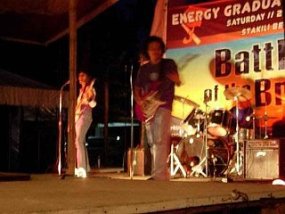
Great and wide ambiance, it is because of these following factors:
a. The stage is set wide compared to a human listener.
b. Stereo speakers are set wide apart (the left and right stereo I mean)
c. If there are two guitarists, having the two guitars playing two guitar will create some delays adding depth to the sound.
d. Reflections causing depths like echo or reverb as well as the size of the stage.
These are the principles of creating wide stereo ambiance in your recording. So how can we do this during the music production process???
Techniques to enhance the stereo image/ambiance
The short answer is to do this correctly during the recording and mixing process. You cannot make some miracles during mastering process to create depths except widening the stereo. Although stereo widening and enhancement are common audio mastering processes, it is also important you should attention to the stereo image during the audio mixing process.
Below are the techniques I used to improve the stereo and ambiance during the recording and audio mixing process :
a. Double recording:
Believe me or not, but double recording is a very effective technique. To do this is to double record in left and right tracks in the stereo field.
For example: I record on the left (panned -50 or to your own preferred choice) channel, then record again on the right channel (panned with the same value as the left) same track. This will produce doubling effect and the little delay in the notes creates cool ambiance in your recording.
For even better result, you will not only do this once, but do several takes to even create a better stereo ambiance. Panned it in different locations farther from the center like 95%, 75%, 60%, etc.
This is a very effective technique in improving the guitar sound in the mix. I suggest you would be reading this tutorial on recording overdubs for guitars.
For vocals, double recording is also recommended but panning assignments would not be as wide as those used in the guitar. You might want to assign a distinct EQ settings for each of those tracks to give their unique sound in the mix.

4 Responses
@James, No. one mono guitar track on the LEFT channel (pan left, e.g. -90) and one mono guitar track on the RIGHT channel (pan right, e.g. +90). Each of these mono guitar tracks will be recorded in a slightly different scenario (different mics, amps ,etc) to create some differences (in terms of ambiance) when these are rendered to stereo.
when you mentioned double track for right pan,do you mean 2 tracks recorded for right side pan,and 1 track for left pan?
Hi Bjazz,
Thanks for commenting this post. If you need to double track (for whichever purpose such as thickening the sound), and do panning, you will lost the panning effect as long as you pan the other instruments in the 180 degrees opposite. Let me illustrate a bit:
Say you pan these instruments in stereo (illustrative figures only,it may depending on your application or recording software):
piano left = -50 panning units
double tracked piano = +50 panning units (so you need to pan the other piano track on the right -50 units to preserve panning effect).
double bass right = +10 panning units
double tracked double bass left = -10 panning units left
Do the same thing with all instruments. With this technique, you will not lose the panning effect which is essential in a stereo mix.
Cheers.
Appreciate your technique on stereo ambiance. I perform and record our jazz trio gigs. I pan piano left, double bass right, drums – center left right. If one creates a double track for each initial track, don’t you lose the panning effect? Or do I have to adjust the panning in each newly ‘doubled track’ to reflect the initial pan settings on the original track? Thanks. Brian