Guitar EQ Mixing for rock, country and pop


Amplifier technique for capturing distorted guitars – useful if you are recording overdriven with a guitar amplifier.

EQ Guide for Guitars

Mixing guitar frequencies for rock music, pop and country:

In the following EQ settings, you will be using a parametric equalizer. Personally, I am using Waves Paragraphic EQ (3-bands), such as shown below:
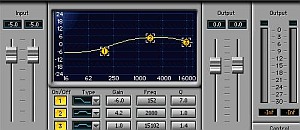
Waves paragraphic EQ

You can use any parametric EQ, but it is recommended you would be using a precise, accurate and industry accepted EQ.

High pass filter or a low shelving filter with cut off frequency at 200 Hz (for all applicable genres)– this will roll off guitar low frequencies (the bass) which can conflict with bass guitar sound.

However this is a one-fit-all solution; some guitars don’t sound good with low shelf cut at 200Hz. So you need to use your ears when doing the adjustment. Sometimes you might want to start cutting starting 150Hz or even 100Hz, it depends.

Cut -9dB at 3Khz, Q = 1.4 (for pop and country) — by cutting 9 dB at 3000Hz, you are making a hole in guitar middle frequencies which vocals can sit in. -9dB is a strong cut off which is recommended for pop and country music.

Some guitars sound fine at -6dB while -9dB cutting is too much for some application, remember to use your ear in judging the sound. Too much cutting will tend to loss most of the guitar sound main character which can be bad for music production.

But rock music is more popular with drowning vocals. So instead, you can cut conservatively at -3dB to -6dB only. You can start with those settings.

Boost 3dB at 400 Hz (Q =1.0) for rock music only. If you are producing rock guitars (with distortion or overdrive); boosting 3dB can make the guitar sound heavier than it seems. This works best when the bass guitar has been cut off at 400Hz also (or not boosted at this frequency range); if not then it may sound less effective.

Cut -6dB at 800Hz at Q=1.4 for all applicable genres. This will make the guitar sound clean and sound more professional. If this is not done, the “cheap” sound of the guitar will appear prominent which can be distracting to the ears. This will remove the annoying mid-frequency content of the guitar common in low-end guitars.

Boost 2dB at 6000Hz at Q=1 for pop and country genres. This is particularly important if you have a lot of acoustic guitar arrangements and it will tend to “shine” prominently with crisp at these frequencies. Also, this can be helpful to add more life and sparkle to guitar solos whether acoustic or overdriven guitars.

These are the only settings I care when I EQ a guitar, the rest of the frequency ranges I leave it as it is.

Implementing those EQ settings above is not enough to get the clarity you need in the mix. You still need to work on other instruments in the mix. For other instruments, it is recommended you will checkout this awesome tutorial.

Content last updated on October 23, 2012

Pages: 1 2

CATEGORIES:

Music Mixing

11 Responses

  1. Hi Bradley,
    When mixing live performances, I tend to simplify the EQ as much as possible with these settings:

    Guitars: high pass filter cut at 200Hz, Cut -6dB at 3000Hz, Cut -3dB at 800Hz
    Vocals: high pass filter cut at 200Hz, Boost 3dB at 3000Hz
    Kick: Cut -9dB at 50Hz Q = 1.4, Boost 6dB at 100Hz, Q=1.4 Cut -6dB at 400Hz, Q= 2.0
    Bass: Cut -9dB at 100Hz Q=1.4

    Then tweak the volume during the rehearsal, as you can see, you need a mixer and a parametric equalizer to get the best sound.

  2. Well, I am completely befuddled with mixing. During recording you can just keep trying till you get it right, but in a live application I pull my hair out. During practices I try like the devil to get it right, but for the sake of time, I just get on with practice. Other than guitar technique, what do I do???:( I primarily play a mix of rock and country if that means anything. Some of my recordings are on my myspace which is .com/bradleysherrer if you can give me tips and pointers. I will be greatful for any and all help. Thanks in advance

  3. Hi Emerson, thanks for the quick reply.
    I’ve read your posts on all drum instrument mixing, once I’ve finished programming all my drum tracks I’ll try to implement all your suggestions.
    Another question for you, what does normalization do? In cool edit pro the normalization option says “normalize ‘to’ (fill in numbers) db, but in your tutorial says to “normalize ‘at’ (certain) db, is this the same thing? Like i said, I’m very new at all this hope you don’t mind the constant trivial questions. Thanks again dude, cheers…

  4. Hi Leo,
    Yes of course, once the drum tracks created by fruityloops are in placed in the software mixing session project, you still need to mix the drums in adjust the panning and EQ. So that it will fit with the rest of the instruments(like vocals, guitars and bass).

    Below are the important tutorials written about mixing drums (snare, kick and hi hats):

    https://www.audiorecording.me/kick-drum-eq-settings-and-compression.html
    https://www.audiorecording.me/snare-drum-eq-compression-and-panning-mixing-tips.html
    https://www.audiorecording.me/mixing-cymbals-and-hi-hats-getting-it-sound-right.html
    https://www.audiorecording.me/how-to-pan-drum-instruments.html

    Good luck in your mixing 🙂

  5. Hi Mark,
    It is the mixing engineers role to identify the main objectives of the mix. This is coming from the producer itself. Some producers advise engineers to make vocals stand out of the mix (like for those artists in pop and country), so guitars are being cut in favor of the vocals. However, there are also very rare instances where guitar needs to stand out also since the guitarist is a superstar(like Joe Satriani playing in a band) as compared to the vocals. In this case, I would use the following EQ settings:

    Vocals and guitars occupy the same frequency space, so:
    Vocals= cut -2dB at 3000Hz Q=1.4
    Guitars= boost 2dB at 3000Hz Q=1.4
    Other instruments= cut -1dB to -2dB at 3000Hz, Q=1.4

    The above setting is a good way to start, remember to use your ear in the tweaking process. The settings above will work whether the guitarist is playing lead or rhythm.

  6. Oops forgot something, I also meant to ask you, whats the ‘common’ practice for mixing snare drums, hihat, toms, etc? I read your mixing arrangement for kick drum, how bout the rest of the kit? :D. thanks again…

  7. Hi Emerson, Thanks for the reply. Now I understand using the LPF and HPF.
    Another question, regarding your explanation on drum recording using midi (programming drum), right now I’m using fruity loops to create drum tracks, do I still need to mix the drums, or should i just leave it as it is? what’s the common practice? do people still mix the drums even though they’re using midi drums? thanks again, love the blog… Cheers

  8. Hi Emerson –
    Is there a rule of thumb on cutting other instruments and vocal frequencies for the guitar? I seem to be having trouble getting it to stand out clearly in the mix.
    Thanks.
    Mark

  9. Hi Leo,
    Thanks for dropping by the blog. I appreciate you find the information helpful. Anyway, lets address your concern one by one:

    1.Can you help me with the high pass/ low pass filters? OK high pass means (passing frequencies above the cutoff, if the cut off is 100Hz; then the filter will only allow frequencies above 100 Hz to pass, the rest; like below 100Hz will be cut off drastically). Opposite will happen with low pass filters(which is passing frequencies below the cutoff). If the cut off is 1000 Hz and using low pass filter, it will pass only below 1000Hz while above it will be attenuated.

    2.Do we use the ‘low/high shelf cutoff in the parametric eq menu? Yes, low and high shelf cutoff does not use Q and you can find it somewhere above the normal EQ settings.

    3. or do we use the fft filter, and just cut off the unwanted frequencies there? No I do not use this one in the mixing process, it just to complicated.

  10. Hi, my name is Leo, first let me say, great blog, mostly people that writes blogs are self centered individuals that like to “listen to the sound of their own voice” but not this one, very very informative. Very helpful. Please keep it up..

    I’m a beginner in digital recording, I’m using cool edit pro 2, an old version of adobe audition, I think. Can you help me with the high pass/ low pass filters? Do we use the ‘low/
    high shelf cutoff in the parametric eq menu? or do we use the fft filter, and just cut off the unwanted frequencies there? Thanks in advance, I’m just confused why they included so many types of filters in the program, I’m having trouble working out which one to use for what. Thanks again. This is going to be the first of many more questions coming ur way, I hope u don’t mind. Cheers..

Leave a Reply

Your email address will not be published. Required fields are marked *

This site uses Akismet to reduce spam. Learn how your comment data is processed.