Digital Audio Workstation or DAW is one of the commonly used terms in home music production environment. Yet some are still confused especially the beginners in music production with no electrical/sound engineering background as to what is really the meaning of Digital Audio Workstation? The fact is that, it’s so hard to understand what is digital audio workstation without giving the beginner; a complete information of how everything starts and end in music production. It’s why this lengthy post is perfect for those completely new in digital-based home recording or recording music using computers! Let’s get started..
First, you need to understand how the music goes into your computer. Your music is a complex sound wave which is analog in nature, a continuous form of signal(e.g. a sine wave). A musical instrument or a disturbance (e.g a water droplet falling into a pail of water) and can cause vibrations in the air that causes it propagate in the form of a sound wave. When these air pressure vibrations reaches your ear, you will perceive it as a sound if the pressure is strong enough to cause vibrations in your ear drum and if the frequency is audible (20Hz to 20,000Hz). The music you hear are actually composed of musical notes which are sinusoidal in nature and has two properties which are:
a.) Amplitude (how strong are the pressure vibrations, which is usually measured by SPL or sound pressure level using decibels).
b.) Frequency( how high or low is the pitch of the sound wave, measured in Hertz)
What happens if the music is recorded?
When you put a microphone in front of a sound wave source such as a guitar playing or a person singing. What happens is that the microphone converts the sound wave into an electrical signal which is also in analog form. Microphone is a transducer that converts sound(acoustic) energy to electrical energy. This captured electrical wave by your microphone mimics the amplitude and frequency characteristic of the recorded sound wave. How accurate is the reproduction now depends on the microphone being used. Condenser or ceramic microphones offers the widest and the most accurate frequency response, it is why it is generally expensive compared to dynamic microphones.
What happens to the frequency and amplitude after recording?
When it is now converted into an electrical signal using a microphone. A sound wave is now called as an “analog audio”. Analog audio has two properties:
a.) Voltage/Current –measurement of amplitude. A higher voltage/current means a loud captured sound. Since analog audio is also a continuous form of signal, the volume can be represented as voltages or fluctuations in the analog domain such as +0.2volts, +1.0volts, -3.0volts, -0.86volts, etc.
b.) Frequency – measurement of pitch (units in Hz)
Anything that is outside your computer is an analog device; example are the microphones, guitars and mixers. In these devices, the audio signal is still in analog form. Modern computers used in home recording and music production is NOT an analog device. It is a digital device which can only accept, analyzed and output information as 0 or 1. A good example of a digital information is a series of 1 and 0 such as: 10100110101001010010101010111001 ; They are not continuous form of signals since it starts and ends abruptly, hence it is called a binary information or digital information. Digital can be represented as a square wave instead of being sinusoidal so the ups and downs represent 1 and 0.
So what happens when an analog audio is processed to a computer?
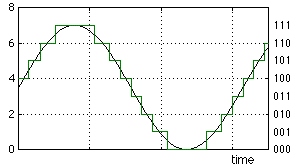
This where you need a device called as an “analog to digital converter”. Its job is converting the analog audio (in volts) into a digital signal (series of 1 and 0) that your computer can understand. Common home studio devices such as sound card and external audio interface handles that analog audio to digital conversion tasks. How accurate is the conversion now depends on the quality of your analog to digital converter, expensive sound cards or audio interfaces means better/quality conversion. Bear in mind that we are not still talking about DAW yet.
Take note that an analog audio cannot be reproduced “perfectly” into a digital audio even for very expensive sound cards or audio interfaces. There will be some quantization errors during the conversion, but you cannot even notice it in reality and in your studio monitors. These errors depend on the bit depth and sampling rate. What appears to be an “acceptable” reproduction of an analog into digital audio is sampled at 16 bits 44.1Khz. The primary reason is the sampling theorem/pulse code modulation (very detailed explanation in the next section).
But for best quality in music production, it is why its good to aim higher than 16bit/44.1Khz. This is where you might hear audio professionals recommending recording at 24-bits and 44.1Khz or better for optimum results. After conversion, your analog audio which is represented as +0.2volts, +1.0volts, -3.0volts, -0.86volts now becomes a series of digital bits (also known as “digital audio”):
10100110101001010010101010111001
11001101010100010101001010110011
11100101010100010100001110101001
These bits will even become longer as your recording bit depth and sample rate are increased. It is then bounced or saved to your computer hard drive which your computer can access. The higher the bit depth and the sampling rate, the bigger will be the resulting file size of the digital audio being recorded.
Pulse Code Modulation in details
The heart of the analog to digital conversion is PCM (Pulse Code Modulation). In PCM, it is a standard of representing analog signals in the digital domain. This is a sampling technique; using a high resolution sampling method results in a more accurate digital representation of the analog signals.
Now to sample an analog audio to digital, your converter needs two parameters:
a.) Bit depth
b.) Sampling rate
Analog is represented by continuous signals such as voltages. After all when the sound wave hits the microphone, it is first converted into microphone levels (weak millivolts) then it will be amplified by audio interface or mixer pre-amp into line level signals. Line level signals are stronger voltages which are then inputted to your analog to digital converter inside your audio interface.

No responses yet