***Home Music Production/Mixing/Mastering Tutorials
***Music Publishing and Music Business Tutorials

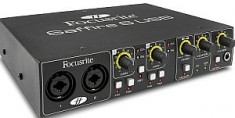
Saffire Pro 40 Potential Problems and Issues to Avoid

by: Emerson ManingoEmail Author on December 7, 2011 in Recording Equipment

Saffire Pro 40 is one of the best audio interfaces around $500. It can accept 8 preamp inputs and provide around 20 inputs/20 outputs total. It is capable of recording up to 24-bit/96KHz resolution. It is using Firewire as a connection from the hardware to your PC.

This post would list down the potential issues and possible solutions in using Saffire Pro 40. Knowing this in advance, you will learn how to avoid the potential problems associated with using this audio interface.

I am using this audio interface for around 2 months already and all problems are not related to the hardware itself but more on the PC hardware and software configuration.

Potential Problem: Audio Latency and DropOut

I have once an old PC which is using the following specifications:

1.) ASUS P4P800-X
2.) Windows XP OS
3.) Intel Pentium 4 2.4GHz
4.) 2GB RAM
5.) Two hard drives at 160GB each
6.) Firewire connected using a very cheap Firewire PCI card

The Windows XP OS has been installed since 2006 and it has never been reinstalled and repaired. Also the hard drives are kind of faulty and I received some check disk errors during booting.

Finally I went to install Saffire Pro 40 drivers and attached the hardware to my PC, so what’s the result? Audio drop out and latency.

At first, I am worried it can be related to the hardware and driver. So I went to reinstall the driver by going to the Focusrite website. But the problem is still not resolved.

Occasionally it went well, but when I play some MP3 files via Windows Media player for a long time, the audio playback tends to drop out randomly.

To add to the problem, my hard drive finally crashed on the fifth day and I suspect not only hard drive problem but a motherboard problem as well (its been running since 2006) because the problem persist even removing the faulty drive.

So I get a new motherboard, CPU, RAM, hard drive and went to re-install Focusrite Saffire Pro 40 on Windows XP again. This finally resolves the issue.

Until now, I do not encounter even a single drop out in the playback and recording. It now works perfectly.

LESSON: If your computer has some motherboard, hard drive and other related hardware/software issues, it can cause audio drop out in your audio interface. So you need to fix that one.
Read the rest of this entry »

Cheapest 24-bit/96KHz USB Audio Interface and DAW for Windows 7

by: Emerson Maningo Email Author on December 6, 2011 in  Recording Equipment

This post lists the cheapest 24-bit/96KHz audio interface and DAW software for Windows 7 laptop and desktop PC. I created this list because I received a lot of questions pertaining to this topic mostly from the starters/beginners in home music production. Also, they are not still well-informed about audio interface and will have a hard time doing some research on what to buy.

In reality, there are really a lot of choices out there and you will be spending a LOT of time in doing this research. Luckily, I already done this and would like to share all the results here. This saves your time. What I will do here is not to recommend a single product but to present a complete list (as of December 2011). Its up to you what you find is most important to your needs. It can be the price, features, the rating or the brand reputation.

If you are in the hurry, go directly to the Recommendations section near the bottom of this tutorial.
Read the rest of this entry »

How to Easily Convert your PC into a Recording Studio?

by: Emerson Maningo Email Author on December 6, 2011 in  Recording Equipment

Today, it is not hard to create a recording studio right in your home. Back in the old days, musicians should go into a professional recording studio to have their songs recorded. But now with a simple as a PC or a laptop; you can start creating your recording studio. How?

Step1.) Comply with the minimum hardware and OS requirements

Below are the optimal OS and hardware specifications for recording studio applications with your PC:

a.) Windows XP Service Pack 3 or Windows 7, 32-bit system is recommended for starters. However a 64-bit OS should also work.

b.) At least Pentium 4 processors (the faster the better). For example, currently I use Intel Core I3 3.1GHz which is very stable and OK with my PC.

c.) At least 2GB RAM (4 GB RAM recommended). Audio processing and recording can be a memory and CPU intensive task, so make sure you have enough RAM.

d.) Modern motherboards with USB and Firewire slot. If your current PC does not have a Firewire slot, you can buy an additional PCI Firewire card.

e.) At least 500GB hard drive (1TB recommended)- recording consumes a lot of hard drive space because the recordings are saved as 24-bit WAV file.

f.) Having a dedicated video card for your PC is recommended but not required.
Read the rest of this entry »