Wanna produce hip hop tracks? I am not a hip hop producer but I can teach you the basics on how to create hip hop beats using hot stepper and Adobe Audition.
The Process
First, download Hot Stepper here.
This program is supposed to be freeware when I first using it. But the last time I’ve checked it, its now upgraded to shareware. However you don’t need to buy to use this software. Download it and follow the rest in this tutorial.
Second, launch the program and it should look like below:

Launching hotstepper drum sequencer
Third, experiment with your favorite drum loops right directly in the hot stepper; you can use the mouse to create your own nice musical arrangements.
If you are not happy with its current library of sound samples. You can add new samples to your Hotstepper library. Simply follow this tutorial on adding real drum sounds to Hotstepper.
In my own example:

There are seven tracks in the hip hop drum loops above, namely:
a.) Bass Fat
b.) Short hit
c.) Bass glass up
d.) Banana bass
e.) Synth house bass
f.) Synth high Pizz C
g.) C-boom
Fourth, do not forget to save your file. Click File – Save as –, then type the file name; in my example I name it as mylooops.hpa. The file extension should be there: *.hpa
One issue that you need to deal with Hotstepper is that it will ask you to save every time you close the project. The golden rule of thumb is to click “Cancel” if you are not making any changes to your loop/sequence.
The fifth step is to export EACH track to WAV. Take note that you cannot export the entire tracks at once as this will be limited in the shareware version. You only need to export them one at a time.
For example if I will export “Bass Fat” track, I will remove all the track beat first very carefully (by right clicking on red buttons on the hot stepper sequencer) EXCEPT Bass fat. See screenshot (exporting Bass Fat):

To export, click File – Write pattern wav – {name of your wav file}. Save it to your computer desktop and take note of the file name.
To export another track (example Banana Bass), go to File – Open, and in the warning: “Do you want to save before continuing?” select NO. This will prevent overwriting your original loops.
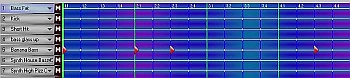
Then find your original .hpa that you have saved, and then open it again. Remove all red buttons except for Banana bass:
Opening all tracks in adobe audition